

Everytime I open DevKit in the backend I see someones other plugin icon misaligned (ACPT plugin). This is due to DevKits default styling which applies to the admin pages. The display: block style is the culprit in index.css:247
/*
1. Make replaced elements `display: block` by default. (https://github.com/mozdevs/cssremedy/issues/14)
2. Add `vertical-align: middle` to align replaced elements more sensibly by default. (https://github.com/jensimmons/cssremedy/issues/14#issuecomment-634934210)
This can trigger a poorly considered lint error in some tools but is included by design.
*/
img, svg, video, canvas, audio, iframe, embed, object {
  display: block; /* 1 */
  vertical-align: middle; /* 2 */
}
This is the link from the menu. Usually icons are injected via the ::before element or the background-image inline CSS style. This one is an SVG image. Thats why it gets misaligned.
<a href="admin.php?page=advanced-custom-post-type" class="wp-has-submenu wp-not-current-submenu menu-top toplevel_page_advanced-custom-post-type menu-top-last" data-ariahaspopup="">
<div class="wp-menu-image dashicons-before" aria-hidden="true">
<img src="http://localhost/wp-content/plugins/advanced-custom-post-type/assets/static/img/advanced-custom-post-type-icon.svg" alt="">
</div>
<div class="wp-menu-name">ACPT</div>
</a>
Uploaded files:
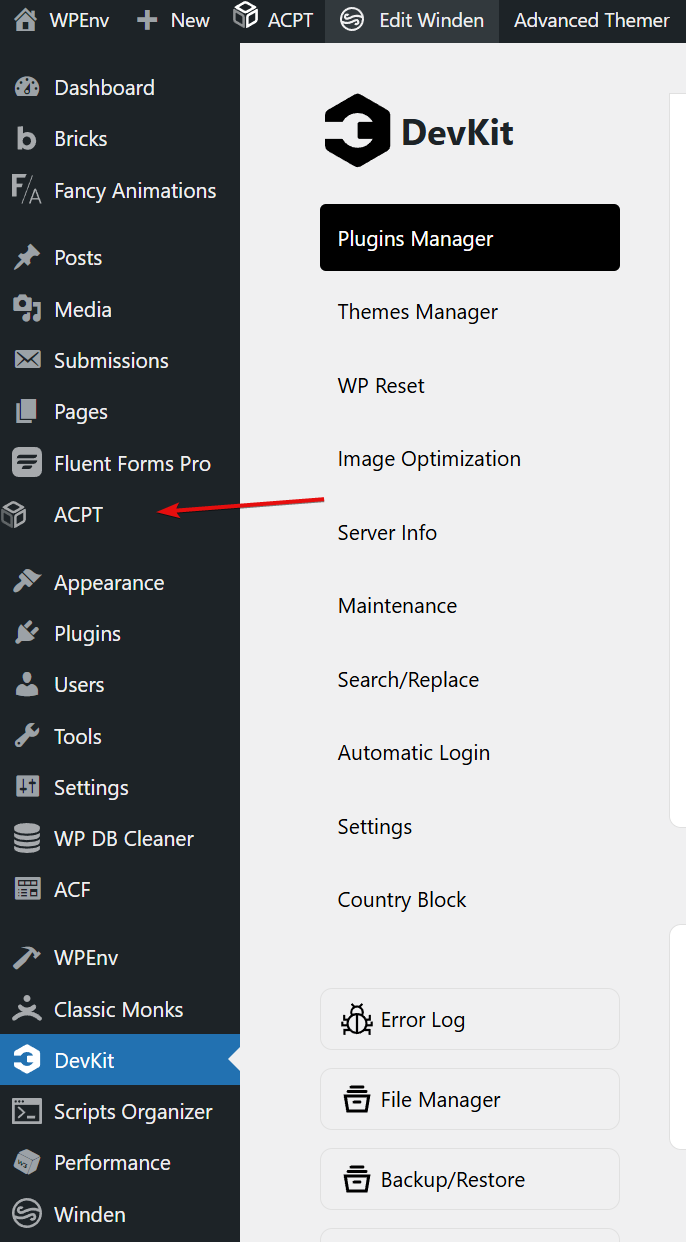
Same happens with Winden btw.
This is solved in development. It will be available with the next release.
Regards,
Arshad
DPlugins Support
Super! Can’t wait 🙂